What Actually Happens to a Document inside an IDP Platform
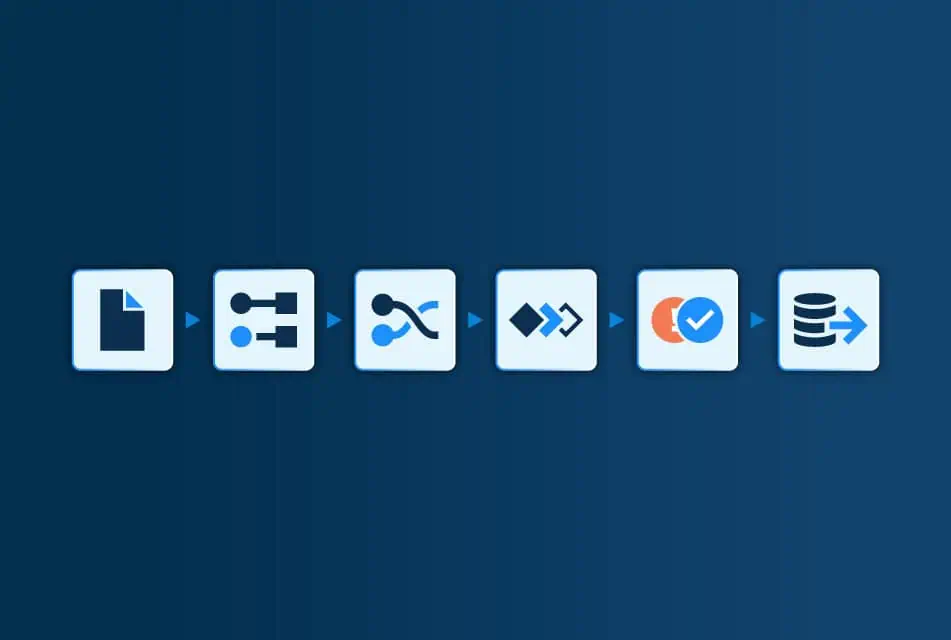
Intelligent Document Processing (IDP) is often discussed as a single capability, but in practice it is a multi-stage workflow made up of several distinct steps. From the moment a document enters the system to the point where structured data is passed into downstream platforms, a series of decisions, validations and transformations take place.
Understanding what actually happens inside an IDP platform is essential for organisations evaluating document automation workflows. It explains why some solutions scale smoothly while others struggle with accuracy, transparency or ongoing maintenance. It also clarifies how Artificial Intelligence (AI), business rules and human oversight work together in real-world document processing automation.
Share:
Intelligent Document Processing: Document Ingestion and Normalisation
Everything starts with ingestion. Documents arrive via email, SFTP, APIs, EDI feeds, or system integrations. They may be PDFs, scans, images, or structured formats such as XML. Real-world inputs vary widely, so a key early step is normalising the document into a consistent internal representation.
At this stage, the platform typically handles file conversion, page ordering, orientation, basic metadata, and quality checks. In well-designed systems, ingestion is built to be resilient rather than restrictive. The goal is to accept documents the way the business receives them, not to force external partners into a single format.
This front-end stage matters because downstream stages can only be as reliable as their inputs. Clean ingestion reduces avoidable exceptions later and supports higher automation rates. Many organisations treat ingestion as plumbing, but it is a real contributor to document workflow reliability in production environments, especially in high-volume operations.
Text Extraction and Layout Analysis
After ingestion, the platform extracts raw text. For scanned or image-based documents this usually involves OCR. For digital PDFs and structured documents, the platform may parse text directly.
However, extracting characters is only the starting point. IDP document processing must also understand structure. Layout analysis identifies headings, tables, columns, line items, and the relationships between them. For example, it must distinguish an invoice number from a purchase order reference and detect which totals belong to which sections.
Modern systems increasingly use AI to interpret structure in a flexible way, rather than depending purely on rigid coordinates. This helps handle natural variation across suppliers, document templates and languages. You can see how Netfira positions this broader capability set in its definition of intelligent document processing.
Document Classification
In many IDP platforms, classification is a complex and continuous task. Systems attempt to determine document type at runtime using pattern recognition, layout features or probabilistic models, then route the document into the appropriate workflow. While this works in controlled environments, it can introduce ambiguity when formats change or suppliers behave inconsistently.
Netfira takes a more deterministic approach to document classification.
Rather than classifying every document dynamically, the platform uses a connection-based model, where each supplier connection is mapped to a specific document type and process during onboarding. This means the system already knows what the document is and how it should be handled before processing begins.
In practice, this reduces the need for ongoing classification decisions and removes an entire class of runtime uncertainty. Documents are routed directly into the correct document automation workflow, with business rules, validations and integrations already defined.
This approach has two key advantages:
Predictability: documents are processed consistently over time, even as formats evolve
Lower operational overhead: fewer misroutes, fewer manual corrections, and simpler governance
Classification in Netfira is therefore not a probabilistic guess made at runtime, but a controlled configuration step that strengthens document processing automation and supports higher straight-through processing rates.
Field Identification and Data Extraction
After classification, the platform identifies fields and extracts structured data. This stage is often described as intelligent data extraction, because the system must understand not just characters, but meaning, context and relationships within the document. Depending on use cases, this can include IDs and references, dates, quantities, prices, currency, tax, line items, and packaging-level hierarchies.
This is where platform methodologies start to diverge. Some systems lean heavily on probabilistic extraction at runtime, scoring confidence for each field. Others use AI document processing to speed up the mapping and setup phase, then shift to more controlled extraction once mappings are validated.
You can find more information about Netfira’s platform methodology at: Netfira’s Approach to AI in Intelligent Document Processing.
From an operational point of view, the benefit of an AI-assisted setup approach is that it can reduce onboarding effort while keeping day-to-day processing predictable. It also means data extraction is not a one-time project. It is a managed system that can evolve with supplier changes.
Validation and Business Logic
Data extraction is only half the job. Data must be validated before it can be used. Validation applies business logic to confirm that extracted values are acceptable within the process.
Typical validation includes:
- required-field checks (is critical information missing?)
- format checks (does a value match expected patterns?)
- calculations (do line totals add up to headers?)
- tolerance thresholds (is a quantity or price within acceptable variance?)
- reference checks (does a supplier code exist in master data?)
- comparisons to related documents (matching against purchase orders, confirmations, or delivery data)
This is where IDP document processing becomes process automation rather than data capture. Validation is also where organisations decide what “good enough for straight-through processing” actually means. Strong systems allow these rules to be configured, adjusted and governed without rebuilding the workflow every time requirements shift.
At this stage, document processing automation moves beyond data capture and becomes a controlled operational system, where decisions are governed by explicit business logic rather than manual intervention.
Exception Detection and Handling
Even with good data extraction and validation, exceptions will happen. Documents change. Fields go missing. Values fall outside tolerance. New edge cases appear.
The key question is not whether exceptions exist, but how they are handled. Modern platforms aim to surface exceptions with clarity, showing what failed, where, and why. That makes human review faster and more targeted.
Methodologies that emphasise deterministic behaviour typically treat exceptions as a controlled pathway: the system pauses automation, captures context, routes to review, and then updates mappings or rules so the same issue is less likely to recur. Netfira’s positioning around AI use in setup and exception handling supports this idea of using AI to reduce overhead where change occurs, rather than allowing silent drift in production processing.
Human Oversight and Continuous Improvement
Human involvement in IDP should be strategic, not constant. This includes:
- validating mappings during onboarding
- refining rules and tolerances
- resolving exceptions where human expertise is truly needed
- approving changes when suppliers alter formats
- monitoring performance and automation rates
This is commonly described as human-in-the-loop automation. Netfira outlines this approach in its Human-in-the-Loop Automation page, including how HITL supports exception handling and accuracy in real-life workflows.
A practical way to think about this is: humans define intent and guardrails, and the platform executes at scale. When something falls outside guardrails, the human loop handles it and strengthens the system for next time.
Integration with Downstream Systems
Once extracted and validated, the platform passes structured data into downstream systems such as ERP, procurement, finance, or data warehouses. This is where the business value becomes visible: less rekeying, fewer errors, faster cycle times, and better traceability.
Why Understanding This Document Automation Workflow Matters
When teams understand the stages inside IDP, they evaluate platforms more realistically. They stop asking only questions like “how accurate is OCR?” and start asking:
- How robust is onboarding and change management?
- How transparent are rules and validations?
- How cleanly are exceptions handled?
- How predictable is processing over time?
- How easy is it to govern and improve?
Those questions are what determine whether document automation workflows become a scalable operational capability or a constant exception-management burden.
Summary: The Steps of Intelligent Document Processing
An IDP platform like the Netfira Platform is a coordinated workflow that moves a document from ingestion through extraction, validation, exception handling and integration. AI can improve parts of this workflow significantly, particularly around structure recognition, onboarding acceleration andexception handling. But reliable outcomes still depend on clear business logic, controlled exception paths and accountable oversight. Understanding this multi-step workflow and its underlying logic and functionalities helps businesses evaluate intelligent document processing solutions.
Automate hours of manual processing
We understand every business has unique operational challenges – and we’re here to help you overcome them.
By continuing, you consent to being contacted by us. See Privacy Policy.